I personally can’t stand flatpaks, they’re too large to update its libs every few days. On a 4 MB/sec line that I’m, it’s not a good option.


Eugenia
Ex-technologist, now an artist. My art: (https://pixelfed.social/EugeniaLoli)
- 0 Posts
- 17 Comments
Joined 3 years ago
Cake day: July 10th, 2023
You are not logged in. If you use a Fediverse account that is able to follow users, you can follow this user.
Try OnlyOffice (the appimage). It’s more compatible than LibreOffice for MS formats. Alternatively, consider downloding the LibreOfficeFresh appimage, which is the latest version (Linux Mint’s is 2 years old). When you download an .AppImage file, you right click it, Properties, and you mark it as executable. Then, run it. Always download appimages from the developer’s source site, not from third parties.
 22·26 days ago
I suggest Linux Mint, it just works. I have moved over 10 people to it in the last 2 years. Basically, giving life to their old laptops. Never heard a complaint! Here’s the latest one, my niece: https://mastodon.social/@eugenialoli/117304062578785444
I disagree. As someone who is running both Debian-Testing and ubuntu-Mint, there is a difference between the two, especially in support of some hardware and some pre-configurations that come handy in some “difficult” machines. Ubuntu has special workarounds for a lot of things, you see. Debian does not. Debian doesn’t even boot on my DELL Xeon workstation, for example. Ubuntu does. And that’s my main issue with LMDE, being based on Debian. Also, LMDE doesn’t have the nvidia driver panel, to make it easier for people with nvidias. If Debian was to create these workarounds for various machines, then sure, why not. LMDE would be just fine.
KDE and XFce DEs are the most customizable to look like MacOS (nothing to do with distros, you can use any distro and then use these DEs to make them look like MacOS). Here’s my XFce: https://mastodon.social/@eugenialoli/114653608461737248
Geary is as simple as they come.
I have tried it, I downloaded it. But while it kinda works now, you can’t untangle AI code in the future. It becomes too complicated and difficult to debug. Any project that uses mostly AI, doesn’t have a future. It only has a temporary present, while things are still simple.
I’m allergic to AI code. It’s worse than spaghetti. I wish it wasn’t AI-made, for the most part.
It’s mostly entertainment, but it has some good info sometimes.
You will have to reinstall the OS, and redo the partition table (256 MB boot partition (that’s enough for a single OS), 2 GB swap, and the rest / root partition). Then install Debian with XFce on the / partition. You use it normally as with any other Debian-based OS, that Zorin is also one of them, but you use the terminal to update the system. It’s very usable.
For 16 GB SSD with 4 GBs of RAM (which is what most Chromebooks used to be), you will need Debian with XFce, with 2 GB of swap partition. Nothing else will either fit, or work properly. I have given away 3 such laptops to friends with that setup (Arch might fit ok too, but because I was giving it to friends, Debian was easier to work with). After installing the v12 Bookworm Debian OS, with libreoffice, a couple of simple games (e.g. solitaire), Gimp, and that 2 gb swap partition, I was left with 5 GB free space. I had to occasionally do
sudo apt autoremoveto make sure the space wasn’t eaten away, but overall, it stayed steady (dh -hwill give you that info). With Trixie, you might end up with 4 GBs of free space, as it’s bigger. Bookworm has updates until 2029.
Not true. Ubuntu’s official nvidia driver installation broke twice for my husband’s PC, one other time they removed a version completely from their list (while we had installed it), and then it had orphaned packages and apt was constantly complaining, while every time we put nvidia as the main card (instead of the integrated intel), the PC does not wake up from sleep under Wayland (while it does under X11, so we know it’s not a BIOS issue).
Also, the Mint forum is full of problems with nvidia drivers, despite running under X11, which is the “easier” environment for its drivers.
Overall, it’s a nightmare, and that’s why we now use the integrated intel as the main gpu, and the nvidia for compute only (for blender and resolve).
Maybe it’s better implemented under Arch-land and Fedora-land, but under Ubuntu/Mint/Debian-land, it’s still a nightmare.
As someone with 3 Macbook Airs from the 2010s, running Linux, I can tell you that you’re wasting your time trying to make these drivers work. They’re unmaintained and they have introduced new bugs as new kernels come out (as the kernel changes over time, old drivers stop working 100%). For example, the mid-2011 Macbook Air locks up completely when downloading large files. The 2012 one doesn’t wake up from sleep due to the wifi.
The solution is to completely disable these drivers via blacklisting them. And then buy a TINY usb wifi, like the tp-link one, for $6. It works perfectly and it takes no space (just one of your usb ports). That’s the solution. Everything else is a waste of time, speaking from experience. The kernel bug reports I did went unanswered.
Linux Mint is the answer for every newbie coming from Windows. You install the faenza-icon-theme from the repo which is not flat, you turn off the autohiding of the scrollbars (they have a gui for it), you turn off tap-n-drag which can wreck havoc (via dconf), do a few other quality of life changes (like the new cinnamon theme), and she should be happy with it. Just make sure you install a newer kernel (from the update app, there’s a menu item for it), so this newer laptop is better supported.
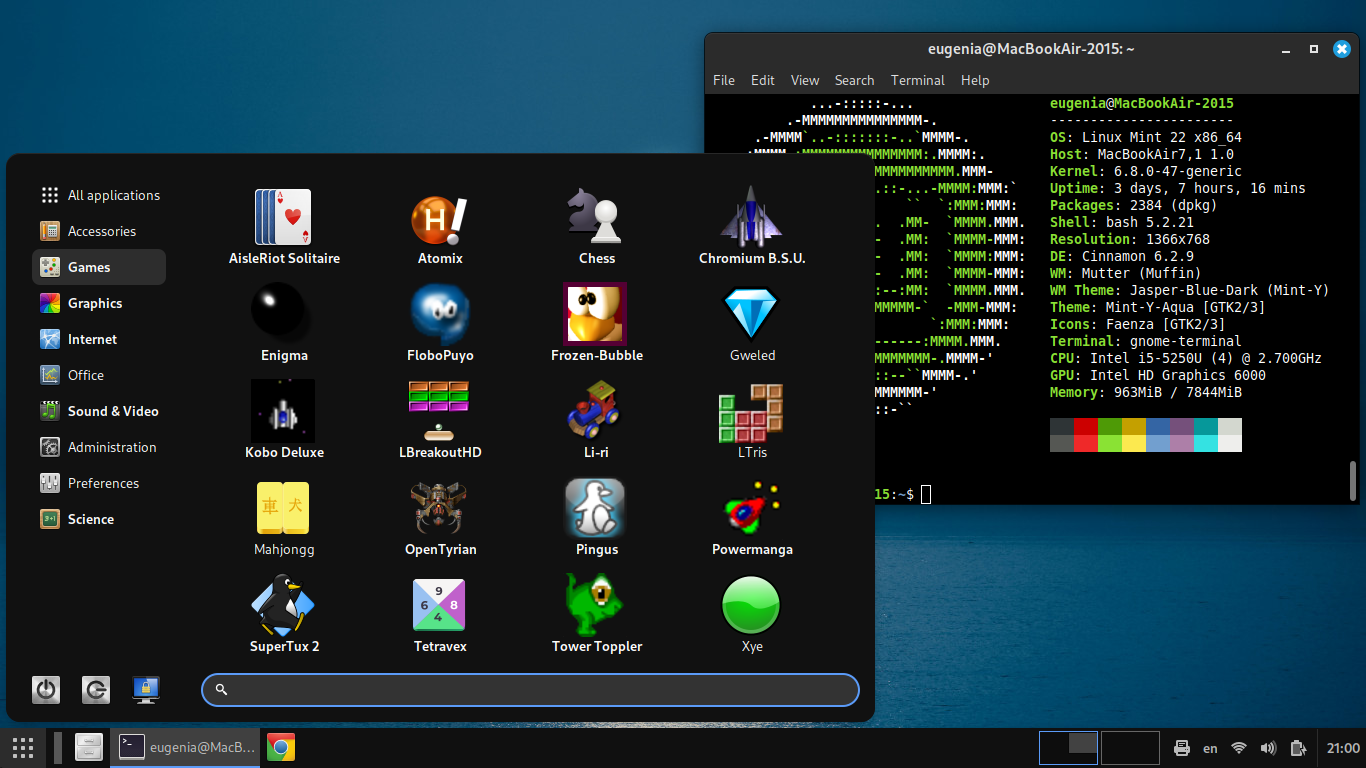
I personally also install Cinnamenu instead of the default menu, and configure it to be super simple like this: https://files.mastodon.social/media_attachments/files/113/391/944/352/704/129/original/7e2ced150dbc8932.png It’s so much more usable than the default cinnamon menu that has small icons.
There are several commercial options for Linux. The most-Ableton software out there is Bitwig Studio that has a Linux port. However, it’s expensive. The cheapest commercial solution, with a bit of learning curve but powerful nonetheless, is Reaper.
However, if you want to go 100% open source, there’s Ardour and LMMS (which is a lot like FL Studio). Ardour 9, which is expected by the end of the year, will be more MIDI-friendly than it used to be. LMMS latest git version (offered as binary on their site) has some good new features compared to their stable version, however, there’s still no vst3 support.
I’m an visual artist and I used Photoshop for years to edit my hand-painted scanned paintings. When I moved to Linux, and Gimp3 was out, I was finally ready to leave Photoshop behind. Some features of Photoshop aren’t there, but I was ready to leave them behind. Same with video, I used to have a rather popular blog about color grading with Resolve. I moved to kdenlive, which has none of these tools or plugins. It’s a decision that I simply had to make. I wanted to use foss tools, and that was the price to pay. I’m cool with my decision.
If you gotta go commercial, go with Reaper. The people (a small team of 3 or 4 I believe) behind it are really cool, and they’re doing it for the love of it, their profit is very small.
With 32MB of RAM you can’t go far. The Linux kernel barely runs on it, and that’s just the kernel. NetBSD also has a minimum requirement of 32GB of RAM. One other thing you can do is try to run BeOS (not Haiku, but BeOS). It could run on 32MB of RAM (it still preferred 64 MB, but it could run on 32 too).
Yes, Kate is a great editor. My husband likes it very much, he writes his hobby AtariST/Amstrad code in it (some modern C too). He dislikes things like vim, he likes gui editors (despite being a linux guy since the '90s). Same for me.