

I did’t know much about the German keyboard layout but I know the Czech one, which is derived from it (we both use QWERTZ) and was able to look up most of what I didn’t know.
So, the keyboard has 4 layers: default, Shift, AltGr, AltGr+Shift (the fourth one is not standard but is recognized by xkb; in Czech I use it for custom character mappings, in German it is standardized but Linux-only).
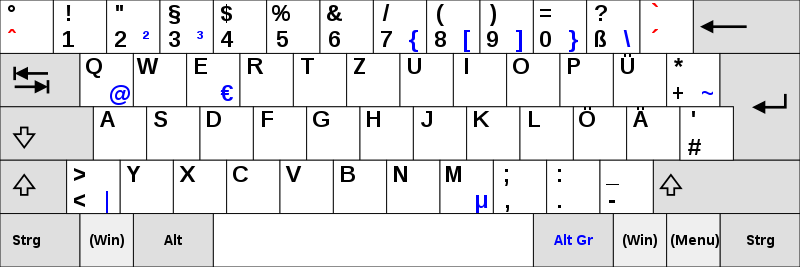
- Default layer prints lowercase letters a-z and äöüß, numbers and the symbols in the lower-left of each key.
- Shift layer prints uppercase letters A-Z and ÄÖÜ and symbols at the top left of each key.
- Caps Lock only affects letters. I don’t know what happens when you press ß with Caps Lock on a system too old to know about ẞ (only in Unicode since 2008, and “allowed” in German since 2017) and I don’t want to make vintage computers explode at 39c3.
- AltGr layer prints lower-right symbols, most of which are only populated in a later version of the layout.
- AltGr+Shift (Linux only) prints upper-right symbols.
As you can see, AltGr+2 produces ², and AltGr+3 produces ³. I think the full-size “2” and “n” are misprints. My old Czech keyboard has some errors too. Edit: found out why there is “n” printed: the keyboard layout was designed for the OEM 850 code page that includes “ⁿ” but not “³”.
By the way, Czech is more chaotic:
- we have lots more diacritics so the number row only prints numbers on its Shift layer (most people therefore use the numpad only)
- to print rare diacritics (ó, ď, ť, ň, and German ä, ö, ü), one has to first press the corresponding modifier key (
´,ˇ,˚,¨) like on typewriters- an alternative for common capital diacritics (á, é, ě, í, ú, ů, ý, ž, š, č, ř) is to briefly turn on Caps Lock (advantage over typewriters)
- pressing the
˚key twice prints the degree sign (°) twice (Windows) or once (Linux)
- there is a bloody dedicated
§key but we need to press AltGr+7 twice, then backspace (or Alt+96) for a grave (`), which is part of ASCII and used in Markdown - physical keyboards almost always reserve the right side of the keys for the English-US layout (very confusing for novices) so one has to type in the AltGr layer blind (except for
€); it contains useful symbols ([]{}<>|\€$@#^&×÷`) as well as useless ones (Đđ – these are Slovene, why not the Slovak Ôô?), leading people to prefer Windows-only left-Alt+numpad codes (such as Alt+64 for @) that use the obsolete OEM-1252 codepage (the Unicode extension has to be enabled via registry and Alt+letters hex codes get passed to programs anyway, often defocusing the input element). I only found a Slovak one on Wikimedia Commons - some lazy manufacturers combine the Czech/English and Slovak/English layouts, which are similar except ľ, ť and ô, leading to 5 (!) symbols per key, 3 of which are irrelevant unless you switch layouts
- Gboard for Android offers QWERTY for Czech, which looks normal (hold for diacritics, potentially swipe for ě and ů) and the unpopular QWERTZ-PC, which has all the physical keyboard’s quirks, but its “Czech QWERTZ” is based off German QWERTZ, containing ú and ů but not the other diacritics for some reason. All other keyboard apps with Czech language layout get this right (hold for diacritics, potentially swipe for ě and ů)!
Edit: found out why there is “n” printed: the keyboard layout was designed for the OEM 850 code page that includes “ⁿ” but not “³”.


Flock cameras are conspicuous with their unique design and can even be identified with a Wi-Fi & Bluetooth scan. Other ALPRs are impossible to tell from conventional CCTV or use all kinds of masking.